 Auto FE Updater Auto FE Updater
 | Home Basic Info Download About |
|
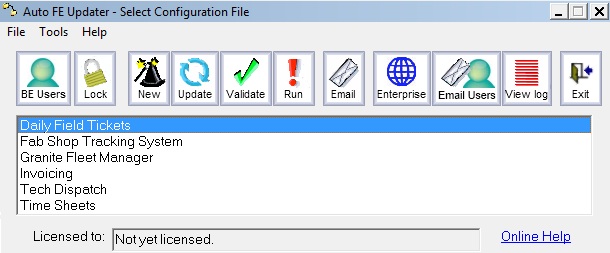
Want an easy way to distribute updates to the users of your Microsoft® Access® front end? Tired of visiting users PCs to roll out a new version of an Access® front end? Weary of explaining to each of the users how to use Windows Explorer to copy the new FE from the server to their PC; And then fixing up the mistakes they inevitably make. And how to get the FE to a new user? This process is exactly what the Auto FE Updater is designed to do and much more. Whenever you need to roll out updates of your Microsoft Access front end (FE) database file and associated files the Auto FE Updater utility will automatically copy the files from a server to a folder on each users PC. When a new user needs to use the application you can email them a link or navigate them to a network share. It's easy! See
The Auto FE updater has been recommended by Microsoft in a blog entry titled Automated front-end management and publishing. However the blog is no longer available. The utility has also been recommended by many of my fellow Access MVPs, many newsgroup and forum posters, various websites and Access books including Fixing Access Annoyances by Phil Mitchell and Evan Callahan Happy licensees include the following
Emails have come from many countries around the world such as Canada, USA, Germany,
Ireland, Norway, Australia, Belgium, Spain, the
Netherlands, Scotland, South Africa, France, Israel and New Zealand.
The Enterprise Edition will show you
exactly who is in the backend database so you can contact the users if you need
to add some tables or fields to the database. Or if a compact and repair
is required. You can easily see if any critical Access exe or ACE,
Jet, DAO or ADO DLLs are out of date. Immediate email alerts of any problems
users encounter with
the utility. You will have control over the users as well as logging
every error, warning, activity including files copied that happens during the
execution of the Auto FE Updater program. UpdatesUse the Check for Updates menu option within the Auto FE Updater utility. Or email me on my contact page and I'll email you every time I send out on update. FeedbackI really want some feedback. What additional features do you want to see? What problems or irritations are you having? Please use my contact page to email me Or join the discussion on LinkedIn. Or pickup the phone and call me. Leave a lengthy voice mail if I'm not available. Sometimes it's easier to discuss things by phone than write things down in an email. |
 Granite Fleet Manager
- the best designed fleet maintenance tracking and
management system available
Granite Fleet Manager
- the best designed fleet maintenance tracking and
management system available
| Contact | Search | Site Map | FAQ | Tony's Main Microsoft Access Page | Privacy Policy |
Website copyright © 2001-2018 Tony Toews |


 The
Auto FE Updater is a drag and drop deployment on the server. No
installation required. Just download, unzip the files and place on the
server. The utility does not require any admin privileges for you to test
the utility or for the users to run the utility.
The
Auto FE Updater is a drag and drop deployment on the server. No
installation required. Just download, unzip the files and place on the
server. The utility does not require any admin privileges for you to test
the utility or for the users to run the utility.